6502 days of christmas
Introduction
I have been programming now for roughly 9 years and as with many developers, the longer I program, the lower I go in the stack. My personal journey went something like:
- Excel functions as a wee school kid
- Html as a teenager to style personal pages in emerging social media (90s/2000s)
- 10 years of no interest in coding whatsoever
- Visual Programming in my studies, which lead to
- Custom components written in
python, which lead to - Compiled PlugIns written in
C#, which lead to - Low-ish level libraries written in
rust - Writing a
no_stdchip-8emulator inrust<- this is the lowest level I have gotten to
where especially the C# experienced helped me then a lot to find my first coding jobs. But still, I never really ventured into even lower level languages like C, or asm.
So time to change that: For this (last) years advent of code I decided to really challenge myself and do it in 6502 assembly.
Advent of code
My relationship with advent of code is so-so: I really like the idea, but I never had the time or interest to follow through with the full calendar. Also the timing kind of sucks, since december is one of the busiest months of the year for me. So looking at the overview, I managed to gather 11 🌟 stars 🌟 over 2 years I participated in (not counting 2025). So don't expect too much solved days out of this one, especially since I'm going in with exactly zero prior knowledge of assembly.
Why the 6502 assembly flavour?
There are quite a lot different assembly languages one could learn and choosing a first one as an entry point was kind of overwhelming in the beginning. A business-valid choice would have been x86-64, since that is what all the pcs at my job are running. I decided against that, since 1: it's boring to go for the most valuable move and 2: I read multiple times that this flavour of assembly is meant to be compiled to and not written by hand that much.
I looked into old chips that were actually programmed in assembly at their prime-time and the 6502 caught my attention. It was used in tons of systems, like f.e. the Acorn Archimedes, or the Commodore 64 and learning it's language could open up the skill to write Nintendo Entertainment System (nes) games, which just sounds great. Also the number of opcodes is low, which should translate into a short learning curve.
Resources for learning 6502 assembly
There is a lot of very valuable information online if one can find it, as always:
- 6502.org is a great starting point where I got most of my other ressources of
- masswerk.at has an amazing overview of the 6502 opcodes, with all their gotchas and modes
- easy6502 was the first ressource that really made it click for me. After going through with it I felt I got the basics down enough to write simple programs myself. Although the difficulty ramps up similarly to the how to draw an owl meme
- 6502.co.uk is on my backlog, if I want to dive deeper
Setting up my dev environment
This was quite annoying. The chip is old and a lot of tech for it was written quite a while ago, so the nice modern toolchains I'm used to were rarely available. Since I did not want to mess around with setting up a toolchain to build 90s/2000s era C projects, I looked at hobbyist tooling developed more recently.
One project I found and used for day 1 of advent of code was the rs6502 crate, since that one has an assembler I could use out of the box. Sadly I had some errors running the built-in Cpu emulator, so for emulation I use the mos6502 crate. There probably also are language servers, but since all the assemblers have slightly different flavours of the constructs they support on top of the standard opcodes, I did not bother and just wrote the assembly by hand.
During coding the solution for day 1 I quickly realized the need for a debugger, but I could not find one that was easy to install and use, so I postponed it, just printing out register states of the emulator after every instruction. Having a proper debugger from the start would have definitely saved time.
The assembler I used initially was very basic, so I ditched it after a while for the customasm crate, which helpfully includes a sample 6502 syntax in it's examples!
The stack I ended up with is roughly:
mos6502for emulating the 6502 cpucustomasmfor assembling my handwritten assembly- A barebones debugger I begrudgingly coded alongside my assembly attempts, which supports viewing memory, breakpoints and steping back in time.
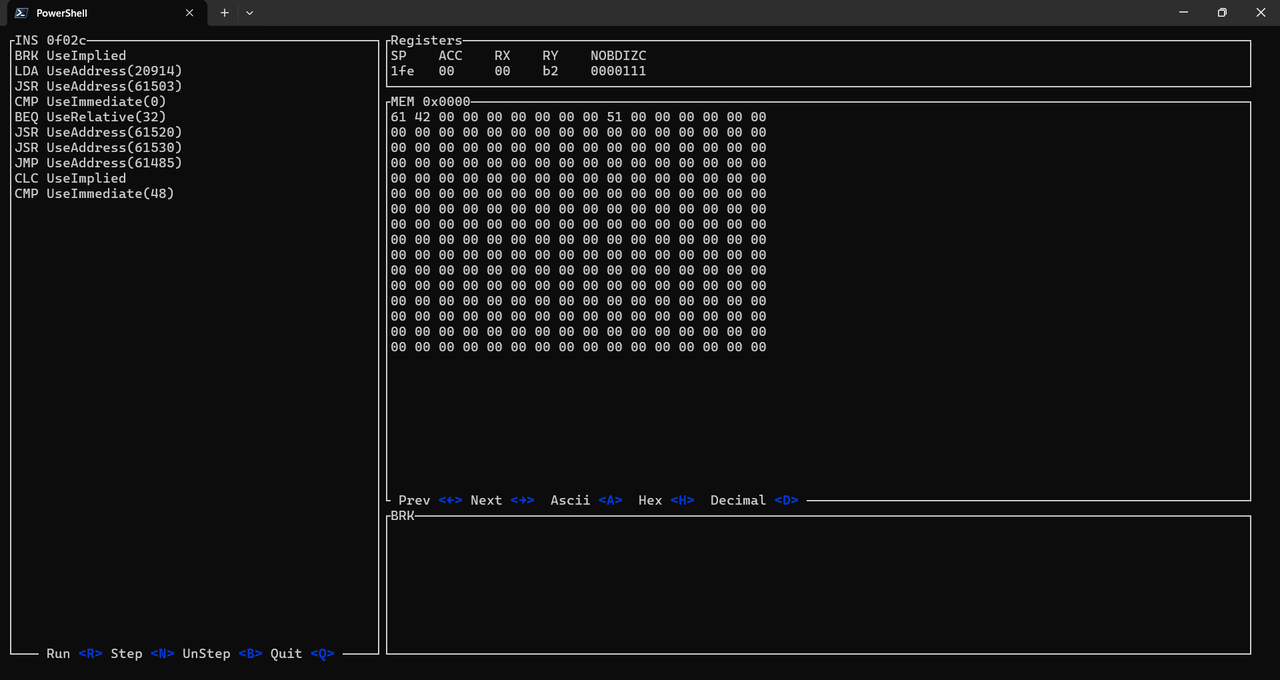 Here you can see the debugger stopped after calculating the result of day 3 part 1
Spoiler ahead
it's 0x4261 from memory addresses 0x0000 and 0x0001
The 6502
There are actually multiple versions of the chip, with the first one that saw wide adoption being the initial release of the MOS MCS 6502. Later versions apparently fixed some bugs and also added more opcodes, but I decided to stick to the OC.
All variants are 8-bit by default, and through and through. That means all registers are only a single byte wide, with no way to combine them into 16-bit values. This initially was very confusing to me, as all one can do with one byte is address 256 memory locations.
Registers
Oh boy, there are almost none and using them has quite the learning curve:
ACCthe accumulator. Used for arithmetic mostly. Typically I keep the variable I'm currently working on in itXgeneral purpose registerYgeneral purpose register- There is also a flags register, which is used for control flow and set automatically inside arithmetic instructions and memory loads
The biggest footguns are instructions that work with one of the registers, but not with another. So f.e. even though most arithmetic only works on the accumulator, there are opcodes for increasing the X and Y registers (INX and INY), but no INA. Another thing that was super annoying is even though X and Y are both kind of general purpose, they are used slightly different when indexing into memory, so f.e. there is LDA (indirect,X) and LDA (indirect),Y which both do something very different, so one must keep that in mind when deciding on which registers to use for what.
Memory Layout
The 6502 has a 16-bit adressable memory space, which equates to 65.536 (2^16) bytes of memory. The architecture does not discern between code and RAM, and everything can live everywhere in the whole address space. In practice you need to be careful though to never overlap, as general memory typically does not equate to valid opcodes.
There are a few special memory locations reserved for internal functionality of the chip:
- 0x0000 - 0x00ff -> Zero page. We are free to write whatever there, but it is used for special addressing modes we will need
- 0x0100 - 0x01ff -> Are reserved for the stack and subroutine stack
- 0xfffa - 0xffff -> Reserved for reset and interrup signals
In general, the memory is split into 256 pages, which each are 256 bytes wide. Some of the instructions take more cpu cycles when they have to cross a page boundary.
Zero Page
The very first memory page from 0x0000 to 0x00ff is special in many ways:
- A lot of opcodes have a special addressing mode for the 0 page
- There is indirect memory adressing, where we store a pointer to a memory address at the zero page. Without that there is no way to address the other memory pages
- Generally all opcodes are fastest (least amount of cycles) when they are executed in ther zero-page-variant
If we can do it in the zero page, we should
Opcodes
I'll focus on the opcodes I used most frequently here, for a complete overview, see the amazing resource at masswerk.at.
Also in the next post, I'll explain the opcodes that I'm using in details as I go along with the solution to day 1
Memory IO
LDA,LDX,LDY-> load a value into a register. Either from memory, or an immediate value f.e.LDA #1loads1into the accumulatorSTA,STX,STY-> store the value currently in the register into a given memory address.INC-> increase the value in a given memory location by 1
Register manipulation
TAY,TAX-> Transfer (copy) the value in the accumulator to registerXorYTXA,TYA-> Transfer (copy) the value in the register to the accumulatorINX,INY-> Increase the value in the register by 1. There is no variant for the accumulator
Control flow

Yeah so control flow is just GOTO with a slight variant of using subroutines via JSR (JumpSubRoutine) and RTS(ReTurnfromSubroutine). Structuring programs and following the flow was very hard for me in the beginning with only this construct.
JMP-> Jump to another instruction by literally setting the program counter thereBEQ,BNE,BMI,BPL-> Break on a condition and do a jump to the memory address. Conditions are equal, not equal, negative, positive (in order)JSR,RTS-> Jump into and return from subroutines. Somewhat similar to functions in high-level languagesBRK-> Kill the whole program (but keeping memory and registers intact). I use that to signal that the program is done
Day 1
I'll go over my solution to day 1 in the next post, to keep this one focused on the general setup and information about the technology itself.